Welcome to PossibNow. This is a place to learn what AI can help you do, try it on work that matters and keep the methods that prove useful. In this issue, you’ll direct a short captioned video of your own explanation inside Claude Cowork, approve the segments before anything is cut, and keep six prompts, a brief outline, three exemplars and a brand sheet you can reuse with your next recordings.
Your best explanations happen in rooms most people never enter, and they stay there.
You walk your team through a framework, explain a decision to a client or lay out an idea on a recorded call. Then the meeting ends and the explanation ends with it.
Video could carry it further. Video used to cost too much, in money and in time, to use for everyday explaining, so you saved it for launches and big presentations. The rest stayed in a memo, a deck or an hour-long recording.
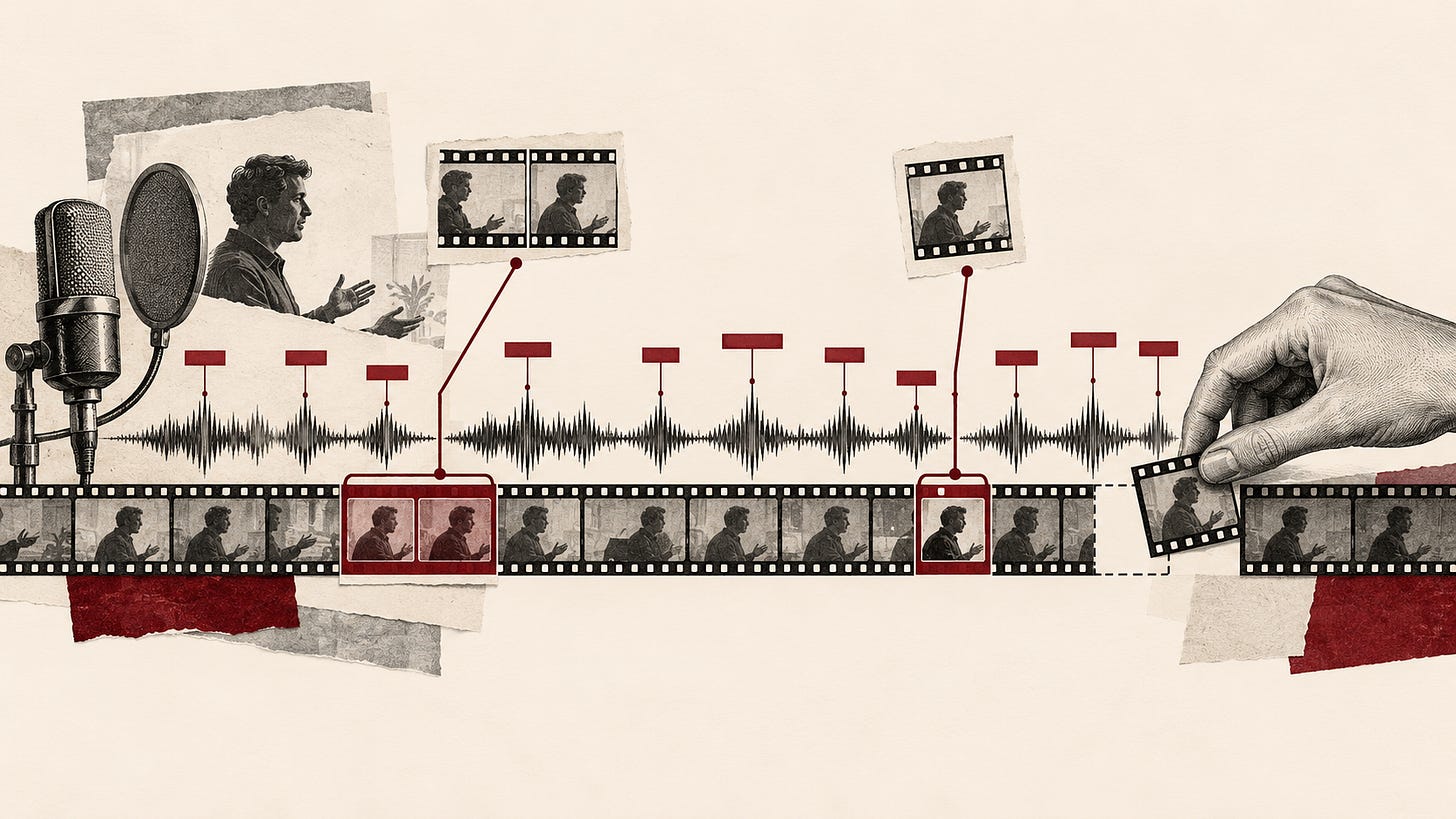
An agent can now find the passage that matters in a long recording, cut it, caption every word and add graphics on the ideas you name. You can do that with code inside Claude Cowork or Codex, with an agentic video editor like Cardboard, this week’s sponsor, or with both together.
Show your work. Here is how I made a short video of my own explanation inside Claude Cowork, with the finished versions to use as exemplars and the prompts to do the same with your own recording.
This week’s loop
Learn: Treat a recording as material an agent can search, cut and caption word by word.
Use: Direct a short captioned video of your own explanation inside Claude Cowork, one pass at a time.
Build: Keep a Show your work kit of prompts, a brief, exemplars and brand details for your next recordings.

Sponsored by Cardboard
Your best explanation already exists in a memo, a deck or a meeting. Cardboard, a Y Combinator company, makes an agentic video editor. You attach your clips and describe the edit, and Cardboard cuts it on a timeline you can still edit yourself.
I tested it on my own footage. I love that it gives you a real editor, so you can do real work by hand. My favorite part is the recipes, formats for different kinds of video that come with prompts and guide you along. Plus their newest release, using it inside ChatGPT and Claude Cowork is a huge unlock.
PossibNow readers get 50% off the first three months at cardboard.ai.
Cardboard sponsored this issue. I test everything I write about, and I accept a sponsor only after finding value for my readers.
Check out Cardboard at cardboard.ai today!
Learn: what changed that matters
A recording becomes searchable. A transcript with word-level timestamps records when every word was said. An agent can use those times to find the passages about one idea, cut between words and place a caption or graphic on the exact word you speak.
Agents can edit video with code. On desktop, Claude Cowork can read and write your local files, and it runs code and shell commands in an isolated environment. That lets it cut, caption and animate a clip with common video tools when its environment has them, so ask it to check first. Code libraries such as Remotion add motion graphics. I use Claude Code with Remotion as one of my own routes, as well as Codex, which also has image creation with OpenAI’s image model, gpt-image-2.
Agentic editors put the agent on a timeline. Cardboard edits on a timeline you can also change by hand, and it connects to Claude & ChatGPT. You can direct the edit from a Claude chat and watch the result there.
Good video still takes your time. Agentic AI, where you start a task and come back to the result, works best when you hand AI the whole job. Video that looks good takes more than two minutes. Let the agent make the first cut, then fix only the parts that need it by hand in a timeline editor such as Cardboard’s, where recipes also save time with prebuilt templates.
Work in passes. Ask for one layer at a time, the cut first, then captions and callouts, then graphics and finishing. Each pass ends with a player you can check before the next layer covers it.
Keep this: Approve the segments before anything gets cut.
Use: do this on real work this week
What I made. I started with two recordings of a podcast conversation, about 23 and 25 minutes each. I wanted a short video about one idea I teach, Learn AI, Use AI and Build with AI as one unified loop.
I chose and approved three segments first, working from word-level transcripts in Claude Code. Then I made the video inside Claude Cowork with Cardboard connected, and one from a recipe. You can use both as exemplars. You can also do this with the remotion skill, and many other video AI tooling.
VIDEO 1: recipe version
VIDEO 2: Claude Cowork Version
Before you start. Pick one recording where you explained something well, such as a team meeting, a client call, a talk or a podcast. Name the one idea you want to pull out. If your meeting tool exports a transcript, save it beside the recording, so the agent has a fallback if it cannot transcribe the audio. If the recording runs long, trim it to the stretch you need first. Choose an exemplar, a finished video whose look you want, and save a few still frames from it. Write a short brand sheet with your colors, fonts, logo file, name and title, and the spelling of any names in the recording. Think PowerPoint templates. Your marketing team can guide you here.
Cowork needs a paid Claude plan. Then either add the remotion skill to your plan, or connect your favorite video tool. Cardboard in Claude is a custom connector with the server address from Cardboard’s setup page, then sign in to your Cardboard account. Cardboard also works in ChatGPT.
Do it.
- Find the highlights. Put the recording, or a shorter clip if you already know where the idea sits, in the folder you share with Cowork. Adapt this CRAFTS prompt to your work.
Context
I've shared a recording of [a meeting, call, talk or podcast]: [file name]. If a transcript file sits in the same folder, use it. I want a short video about one idea: [the idea]. The audience is [who will watch].

Role
Act as my story editor.

Action
First tell me which tools you can use here, including Python and ffmpeg. Transcribe the recording with word-level timestamps if there is no transcript. Find every passage where I state the idea, rate each one for clarity and energy, and propose a 45 to 90 second cut made of one to four segments in their original order.

Format
A table with start and end times, duration, the first and last words of each segment and why it works. Save the plan as highlights.json.

Tone
Plain and direct, like an editor's notes.

Safeguards
Quote only words I said. Take every time from the transcript and mark uncertain timings UNCONFIRMED. Flag client names, numbers and anything internal. Cut nothing until I approve the plan.- Approve the plan and cut the clips. Read the table against your memory of the conversation. Remove anything a client or colleague would not want shared, and change segments until the cut says what you meant. Then have Cowork save each approved segment as its own clip.
Continue as my story editor with the approved plan in highlights.json. Cut each approved segment from [file name] into its own clip, keeping about a quarter second of room before the first word and after the last. Name the clips in order, 01, 02 and so on, and save them to [folder] with a short list of each clip's source times. Write the list so a colleague could follow it. Never cut inside a word, and leave my original recording untouched.- Write the brief. A one-page brief tells the editor what you want before it starts, and it gives you something to check each pass against. Fill in this outline for your video.
Video: [9:16 Reel, 50 to 55 seconds, plus a 2 second end card]
Clips: 01, 02, 03 in order
Edit: remove pauses over 0.3 seconds and the filler words [list]
Framing: my face centered, slight punch-ins on jump cuts
Captions: bold, 1 to 3 words, spoken word highlighted in [color]
Callouts: [term] on "[spoken word]", [term] on "[spoken word]"
Framework moment: [how the diagram builds, and on which words]
Look: [color grade], [transitions between clips]
End card: [logo], [tagline], [link]
Safeguards: my words exactly, nothing cut inside a word, only music I supplied- Open the session. Start a new Cowork chat with the connector on, attach the brief and send this. Pick your clips, logo and music in the upload card itself.
I'm making a [9:16 Reel or 16:9 video] of my explanation from the clips I'm about to upload. The attached brief is the full spec. Act as my editor working in Cardboard. Read the brief, then open the upload card for a new project called "[project name]" so I can add my clips, my logo and any music I own. Edit nothing yet. Reply in one short, plain line when the card is open. Use only music I upload and keep my words exactly as I said them.- Ask for the first cut, with no graphics. Watch the result with sound and fix the cut before anything goes on top of it. A one-line reply such as “the cut at 0:12 clips a word, loosen it” works.
Build the first cut from the brief, with no graphics yet. Put the clips in order, remove the pauses and filler words the brief names, keep my face centered and set the music under my voice. Show me the player when it's done.- Add captions and callouts. Check that each callout lands on the word it names.
The cut is approved. Add the captions and callouts from the brief. Highlight each word as I say it, and land each callout on its word for about a second and a half. Keep graphics off my eyes and mouth, then show me the player.- Finish it. This pass adds the framework moment and the polish.
Now add the framework moment, transitions, color and end card from the brief. Draw [my framework] so each part appears on the word that names it, add the transitions between clips, apply the color grade and fill the end card with my logo and link. Check the frames against the brief, then show me the player.When you approve the result, ask for the export.
Check it. Watch the finished video with sound from start to finish. Read the captions against what you said, especially names and numbers. Check that each label appears on the word it names and that no graphic covers your face. Listen for a clipped word at each cut, and compare the look with your exemplar. Treat a result you have not watched as expected rather than verified.
Keep this: Watch the whole video with sound before anyone else sees it.
Thanks for reading What AI makes PossibNow! Subscribe for free to receive new posts and support my work.
Build: something you can keep
Rung 1, this week. Save the prompts, your filled-in brief, your brand sheet, your logo file and your exemplar frames in a folder called Show your work. Note the placeholders that change with each recording, such as the file name, the idea, the audience and the key terms.
Rung 2, next week. Run the kit on a second recording. Write down every correction you made, such as a misspelled name, a filler word the cut missed or a callout that landed late, in a notes.md file in the same folder. Add the fixes to your brief so the next first cut starts closer.
Rung 3, when you are ready. Turn the folder into a Cowork plugin. Cowork plugins bundle skills, connectors and sub-agents into a single package. Ask Claude to package your prompts as a skill that starts by reading the brief, brand sheet, exemplar frames and notes.md in your Show your work folder. Test it on a short clip and check that its first step reads notes.md before it proposes any segments.
Keep this: A Show your work kit that turns your next recording into a short video of your own explanation.
This week, in order
-
Pick one recording and the one idea you want people to see.
-
Write your brand sheet and save frames from an exemplar.
-
Find the highlights, approve the plan and cut the clips.
-
Write the brief and open the Cowork session.
-
Direct the edit in three passes, then export.
-
Watch it with sound, then save the kit.
Turn one explanation you already gave into a short captioned video this week.
Thanks for reading What AI makes PossibNow! Subscribe for free to receive new posts and support my work.
Get the next one on Friday.
Applied AI for professionals, by Sal Carranza. One workflow a week, free.